


Post image not working

#1 Post image not working
Myself and others have found that postimage has stopped working. Any info David?
Malcolm
I only fit in a 2+2, so got one!
1969 Series 2 2+2
2009 Jaguar XF-S
2015 F Type V6 S
I only fit in a 2+2, so got one!
1969 Series 2 2+2
2009 Jaguar XF-S
2015 F Type V6 S
| Link: | |
| BBcode: | |
| HTML: | |
| Hide post links |

#2 Re: Post image not working
No, spotted it myself this afternoon. Hopefully it is just a glitch. I would however (again) strongly recommend using IMGUR to host your photos. It is free, reliable and easy to use.
David Jones
S1 OTS OSB
1997 Porsche 911 Guards Red
2024 Lexus LBX
Add your E-Type to our World Map: http://forum.etypeuk.com/viewtopic.php?f=1&t=1810
S1 OTS OSB
1997 Porsche 911 Guards Red
2024 Lexus LBX
Add your E-Type to our World Map: http://forum.etypeuk.com/viewtopic.php?f=1&t=1810
| Link: | |
| BBcode: | |
| HTML: | |
| Hide post links |
#3 Re: Post image not working
I'll give IMGUR a try!
Malcolm
I only fit in a 2+2, so got one!
1969 Series 2 2+2
2009 Jaguar XF-S
2015 F Type V6 S
I only fit in a 2+2, so got one!
1969 Series 2 2+2
2009 Jaguar XF-S
2015 F Type V6 S
| Link: | |
| BBcode: | |
| HTML: | |
| Hide post links |
#4 Re: Post image not working
I've got an IMGUR account, but although I can see how to post an image on their site, can't see how to get it transferred onto here
Malcolm
I only fit in a 2+2, so got one!
1969 Series 2 2+2
2009 Jaguar XF-S
2015 F Type V6 S
I only fit in a 2+2, so got one!
1969 Series 2 2+2
2009 Jaguar XF-S
2015 F Type V6 S
| Link: | |
| BBcode: | |
| HTML: | |
| Hide post links |
-
Gfhug
- Posts: 3837
- Joined: Thu Jun 19, 2014 3:08 pm
- Location: Near Andover, Hampshire,in D.O. Blighty

#5 Re: Post image not working
Malcolm, open a photo in imgur then you should see towards the lower right the option to click on something like select for forums. Then that is pasted into where you wish to show it in a post.
Hope that helps
Geoff
Hope that helps
Geoff
S2 FHC Light Blue
S2 OTS LHD - RHD full restoration
S2 OTS LHD - RHD full restoration
| Link: | |
| BBcode: | |
| HTML: | |
| Hide post links |
#6 Re: Post image not working
As Geoff says, click on your photo then copy 'n paste:
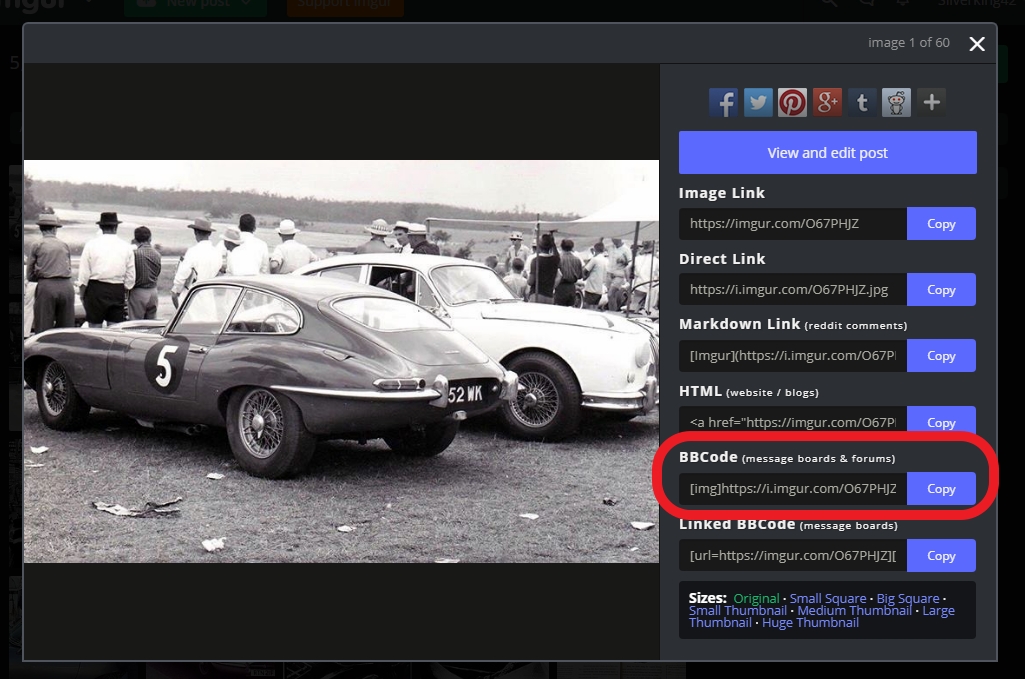
I just posted the above image using Postimage to confirm it is back working
Another advantage of IMGUR is clicking on your posted photo allows people to enlarge it which does not often happen with Postimage.
I just posted the above image using Postimage to confirm it is back working
Another advantage of IMGUR is clicking on your posted photo allows people to enlarge it which does not often happen with Postimage.
David Jones
S1 OTS OSB
1997 Porsche 911 Guards Red
2024 Lexus LBX
Add your E-Type to our World Map: http://forum.etypeuk.com/viewtopic.php?f=1&t=1810
S1 OTS OSB
1997 Porsche 911 Guards Red
2024 Lexus LBX
Add your E-Type to our World Map: http://forum.etypeuk.com/viewtopic.php?f=1&t=1810
| Link: | |
| BBcode: | |
| HTML: | |
| Hide post links |
#7 Re: Post image not working
Thanks both - think I've cracked it!
Test photo below
Test photo below
Malcolm
I only fit in a 2+2, so got one!
1969 Series 2 2+2
2009 Jaguar XF-S
2015 F Type V6 S
I only fit in a 2+2, so got one!
1969 Series 2 2+2
2009 Jaguar XF-S
2015 F Type V6 S
| Link: | |
| BBcode: | |
| HTML: | |
| Hide post links |
-
Gfhug
- Posts: 3837
- Joined: Thu Jun 19, 2014 3:08 pm
- Location: Near Andover, Hampshire,in D.O. Blighty
#8 Re: Post image not working
David, slight thread creep but the user notifications seems to have forgotten to send an email when there's a PM waiting and unable to access that part of user profile at present. Minor thing but wanted to ask, thanks.
Geoff
Geoff
S2 FHC Light Blue
S2 OTS LHD - RHD full restoration
S2 OTS LHD - RHD full restoration
| Link: | |
| BBcode: | |
| HTML: | |
| Hide post links |
#9 Re: Post image not working
Can't think why it is not working unless a user has deleted their email address or it is an old no longer used one. Please PM me as a test.
David Jones
S1 OTS OSB
1997 Porsche 911 Guards Red
2024 Lexus LBX
Add your E-Type to our World Map: http://forum.etypeuk.com/viewtopic.php?f=1&t=1810
S1 OTS OSB
1997 Porsche 911 Guards Red
2024 Lexus LBX
Add your E-Type to our World Map: http://forum.etypeuk.com/viewtopic.php?f=1&t=1810
| Link: | |
| BBcode: | |
| HTML: | |
| Hide post links |
-
Gfhug
- Posts: 3837
- Joined: Thu Jun 19, 2014 3:08 pm
- Location: Near Andover, Hampshire,in D.O. Blighty
#10 Re: Post image not working
David, will send a PM as test. But I have received three PMs today with no email notification that I used to get. The Board Preferences "Edit notifications options" causes an HTTP error 500 when selected (on a Mac or iPad).
The only change I've recently made following a discussion on another thread was to allow users to send me emails.
Regards
Geoff
The only change I've recently made following a discussion on another thread was to allow users to send me emails.
Regards
Geoff
S2 FHC Light Blue
S2 OTS LHD - RHD full restoration
S2 OTS LHD - RHD full restoration
| Link: | |
| BBcode: | |
| HTML: | |
| Hide post links |