Posting photos with Imgur

Talk about E-Types here

Topic author
Gfhug
Posts: 3751
Joined: Thu Jun 19, 2014 3:08 pm
Location: Near Andover, Hampshire,in D.O. Blighty
Great Britain

#1 Posting photos with Imgur

Post by Gfhug » Fri Dec 30, 2022 9:51 am

Trying to help new members to use Imgur for posting photos I’ve cut and pasted a few things from other topics. Maybe it could be made a sticky?

An Imgur account is free and you can upload your photos to it without worrying about image size.
When you’re ready to include a photo in a posting, select the image and you will then be able to choose the option for message boards and forums as shown below.
Paste that into your posting and you should have the image nicely sized for the forum.
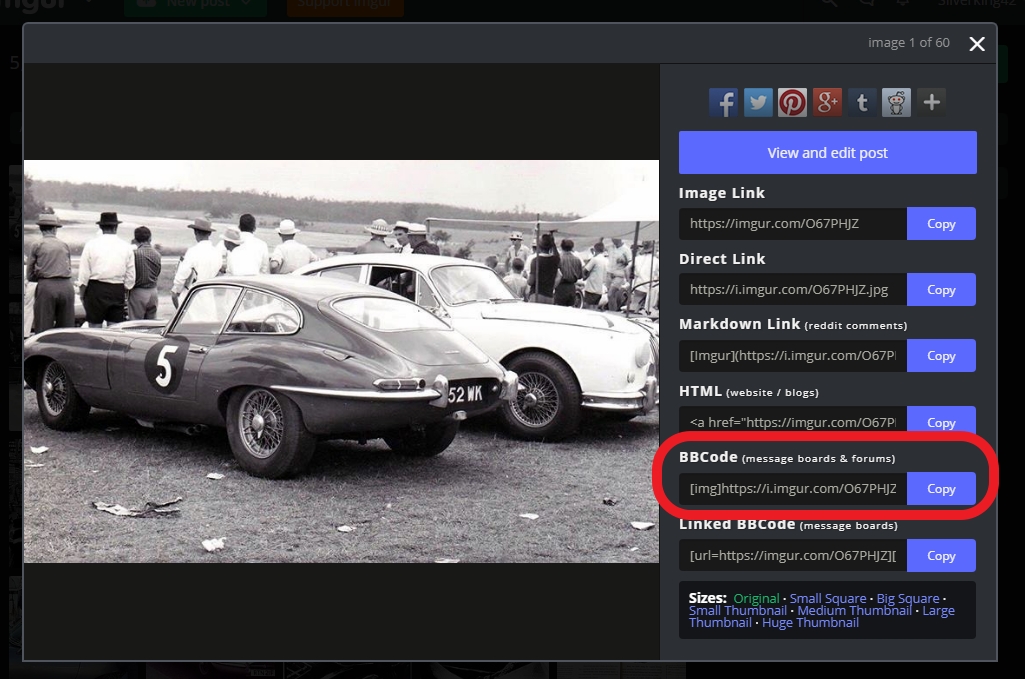
Image

An advantage of IMGUR is clicking on your posted photo allows people to enlarge it which does not often happen with Postimage.

Edited to add a comment about the Imgur App. It has been tried from a smartphone and doesn’t have the same ability shown above. Which would suggest to use Imgur on a computer, laptop or tablet by logging into your online account.

Good luck

Geoff
S2 FHC Light Blue
S2 OTS LHD - RHD full restoration

Link:
BBcode:
HTML:
Hide post links
Show post links


James997
Posts: 17
Joined: Tue Dec 03, 2024 5:30 am
United States of America

#2 Re: Posting photos with Imgur

Post by James997 » Thu Jul 24, 2025 2:32 pm

Thanks for putting this together, Gfhug. The step-by-step info is really helpful, especially for anyone not familiar with how forum image posting works. I’ve tried both Imgur and Postimage before, and the ability to enlarge images directly in the post is definitely a plus with Imgur. Good point, too, about using the desktop version, mobile apps can be a bit limited.

Link:
BBcode:
HTML:
Hide post links
Show post links

Post Reply Previous topicNext topic